Log in to the UMGCCC Research Website
Go to https://research.umgccc.org/user/login and sign in with your UMGCCC Research site credentials.Logging in for the first time or forgot your password? Reset it here.
Don’t know your username? Contact Neil Liwanag at nliwanag@som.umaryland.edu.
Access the RFP Form
After logging in, you’ll be directed to the Resources page.
In the UMGCCC Webforms section, click Request for Proposal.
Complete the Form
The form is organized into 8 sections.Click into each field to enter your information.
Click Next/Previous to move between sections.
You can click Save Draft at any time to save your progress and return later. To continue working on a draft, log in again (step1) then click Load your pending draft.
You can also edit or resubmit a previous form submission, or create a duplicate to update and submit as a new entry:
1. Click View your previous submissions.
2. In the Operations dropdown next to the submission, choose Edit to update the original or Duplicate to create a new version based on the previous one.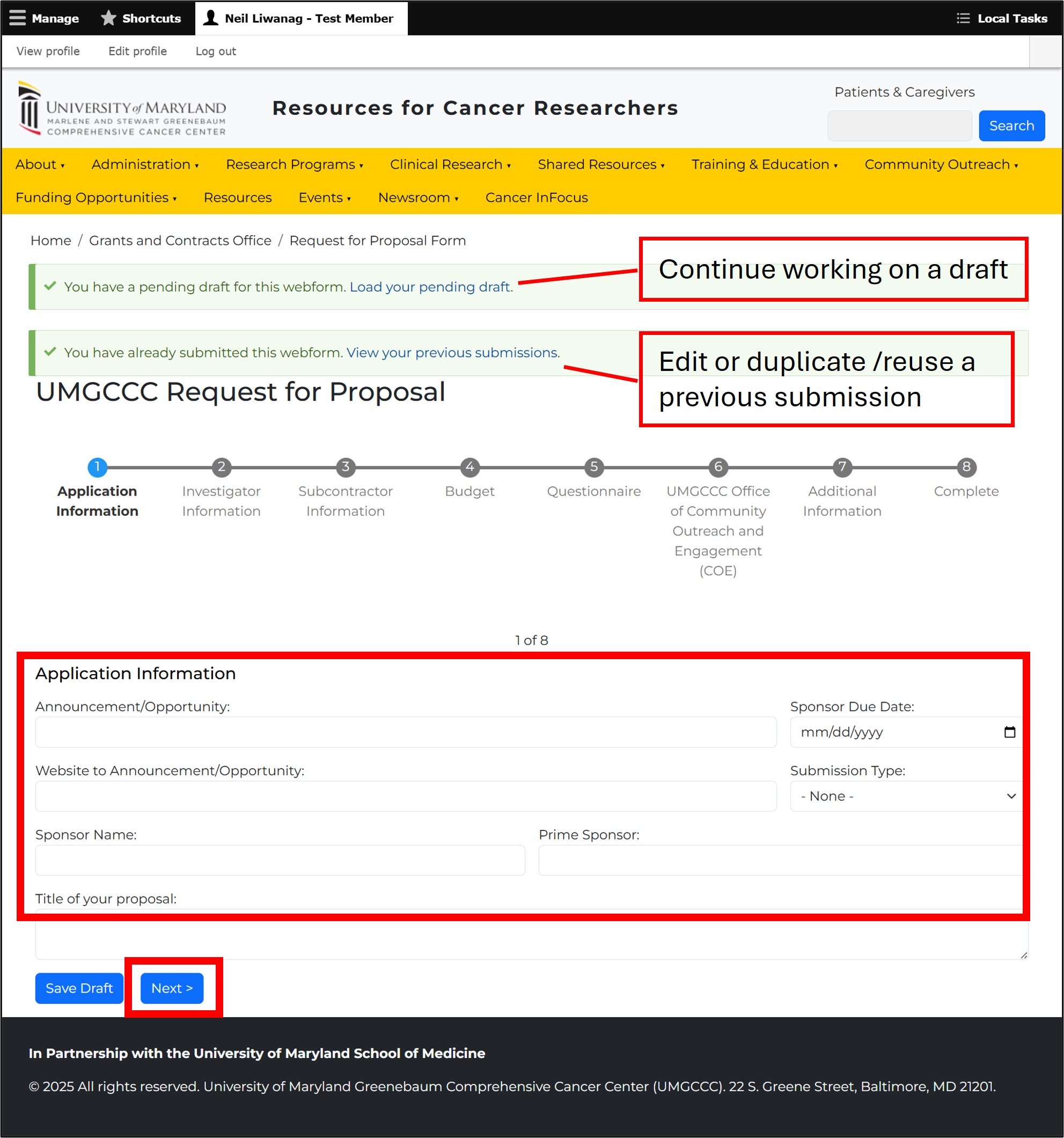
Submit Your Proposal
After completing all sections, click Submit.
A PDF copy of your submission will be emailed to both you and the Grants & Contracts staff.
- About
- Administration
- Research Programs
- Clinical Research
- Shared Resources
-
Training & Education
- Middle & High School Programs
- Summer Undergraduate Research Programs
- Post-baccalaureate: STAR-PREP
- Graduate Training & Education
- American Cancer Society Institutional Research Grants
- ARCH K12 Program
- Continuing Medical Education
- Faculty Development
- International Oncology Observership Program
- Predoctoral T32 Training Program in Cancer Biology
- Postdoctoral T32 Training Program in Cancer Biology
- Postdoctoral Training
- Clinical Residency / Fellowship
- Radiation Therapy Training Program
- Steering Committee
- T32 Cancer Biology Training Grant
- Community Outreach
- Funding Opportunities
- Events Calendar
- Newsroom
- Member Resources